Aug 30, 2020

EasySploit: A Metasploit Automation Bash Scripts To Use Metasploit Framework Easier And Faster Than Ever


About EasySploit: EasySploit is Metasploit automation tool to use Metasploit Framework EASIER and FASTER than EVER.

EasySploit's options:
  • Windows --> test.exe (payload and listener)
  • Android --> test.apk (payload and listener)
  • Linux --> test.py (payload and listener)
  • MacOS --> test.jar (payload and listener)
  • Web --> test.php (payload and listener)
  • Scan if a target is vulnerable to ms17_010 (EnternalBlue)
  • Exploit Windows 7/2008 x64 ONLY by IP (ms17_010_eternalblue)
  • Exploit Windows Vista/XP/2000/2003 ONLY by IP (ms17_010_psexec)
  • Exploit Windows with a link (HTA Server)
  • Contact with me - My accounts

EasySploit's installation
   You must install Metasploit Framework first.
   For Arch Linux-based distros, enter this command: sudo pacman -S metasploit

   For other Linux distros, enter these command to install Metasploit Framework:    And then, enter these commands to install EasySploit:

How to use EasySploit? (EasySploit video series tutorials)

Disclaimer about EasySploit:
   Usage of EASYSPLOIT for attacking targets without prior mutual consent is ILLEGAL. Developers are not responsible for any damage caused by this script. EASYSPLOIT is intented ONLY FOR EDUCATIONAL PURPOSES!!! STAY LEGAL!!!

You might like these similar tools:

You can support KALI LINUX TRICKS from Patreon.


Related links

  1. Hacking Apps
  2. Android Hack Tools Github
  3. Bluetooth Hacking Tools Kali
  4. Hacker Tools Software
  5. Hackers Toolbox
  6. Hack Tools For Windows
  7. Hack Tools For Games
  8. Hack Apps
  9. Pentest Tools Kali Linux
  10. Nsa Hacker Tools
  11. Hacking Tools Mac
  12. Hack Tool Apk No Root
  13. Underground Hacker Sites
  14. Hack Tools
  15. Hacker
  16. What Is Hacking Tools
  17. Hack Tools For Games
  18. Pentest Tools Windows
  19. Pentest Tools For Mac
  20. Black Hat Hacker Tools
  21. Hacker Tools Github
  22. Pentest Tools Bluekeep
  23. Hack And Tools
  24. Hacker Techniques Tools And Incident Handling
  25. Nsa Hack Tools Download
  26. Hack Website Online Tool
  27. Hacking Tools Software
  28. Pentest Tools Tcp Port Scanner
  29. Hacker Search Tools
  30. Hacking Tools Usb
  31. Pentest Tools Android
  32. Computer Hacker
  33. What Is Hacking Tools
  34. Hack Tools Download
  35. Hacking Tools For Mac
  36. Top Pentest Tools
  37. Hacking Tools Github
  38. Hack Tools For Mac
  39. Hacker Tools Windows
  40. Hack Tool Apk No Root
  41. Nsa Hack Tools Download
  42. Hack Tools For Ubuntu
  43. Hacker Techniques Tools And Incident Handling
  44. Pentest Tools List
  45. Hack Tools For Pc
  46. Hack Tools For Mac
  47. Hacking Tools Mac
  48. Android Hack Tools Github
  49. Hack App
  50. Hacker Tools Windows
  51. New Hack Tools
  52. Pentest Tools Port Scanner
  53. Hacker Tools Apk
  54. Hacker Tools Online
  55. Pentest Automation Tools
  56. Pentest Tools Website
  57. Bluetooth Hacking Tools Kali
  58. Hacker Tools
  59. Pentest Tools Linux
  60. Termux Hacking Tools 2019
  61. Blackhat Hacker Tools
  62. Hack And Tools
  63. Underground Hacker Sites
  64. Wifi Hacker Tools For Windows
  65. Hacker
  66. Hack Tools
  67. Black Hat Hacker Tools
  68. Hacking Tools Download
  69. Hacker Tools Apk
  70. Pentest Tools Subdomain
  71. Hak5 Tools
  72. Hacking Tools 2020
  73. Hacker Hardware Tools
  74. Nsa Hack Tools Download
  75. Pentest Tools Download
  76. Hacking Tools For Mac
  77. Pentest Tools For Android
  78. Kik Hack Tools
  79. Top Pentest Tools
  80. Pentest Tools Windows
  81. Pentest Tools Framework
  82. Hacker Tools Free
  83. How To Make Hacking Tools
  84. Pentest Tools Alternative
  85. Install Pentest Tools Ubuntu
  86. What Is Hacking Tools
  87. Hacking Tools Pc
  88. Pentest Tools Online
  89. Hacking Tools 2019
  90. Hack Tool Apk
  91. Github Hacking Tools
  92. Easy Hack Tools
  93. Physical Pentest Tools
  94. Hacker Hardware Tools
  95. Hacking Tools Windows 10
  96. Hacking Tools Pc
  97. How To Make Hacking Tools
  98. How To Install Pentest Tools In Ubuntu
  99. Install Pentest Tools Ubuntu
  100. Hack Website Online Tool
  101. World No 1 Hacker Software
  102. Best Pentesting Tools 2018
  103. Hacking Tools Hardware
  104. Install Pentest Tools Ubuntu
  105. Hack Website Online Tool
  106. World No 1 Hacker Software

Aug 29, 2020

WiFiJammer: Amazing Wi-Fi Tool


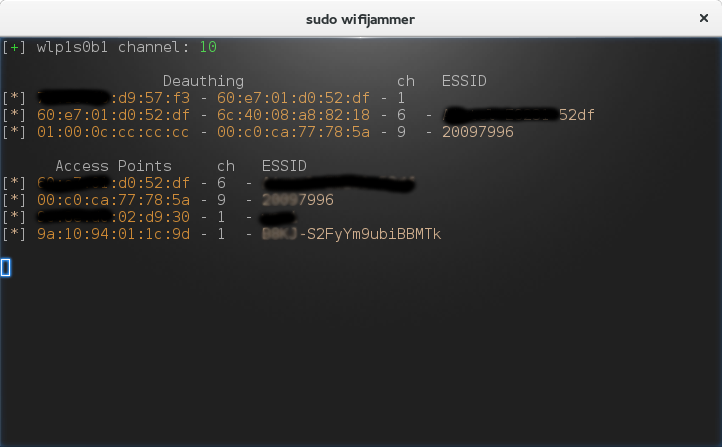
The name sounds exciting but really does it jam WiFi networks? Yes, it is able to do the thing which it's name suggests. So today I'm going to show you how to annoy your friend by cutting him/her short of the WiFi service.

Requirements:


  1. A computer/laptop with WiFi capable of monitoring (monitor mode).
  2. A Linux OS (I'm using Arch Linux with BlackArch Repos)
  3. And the most obvious thing wifijammer (If you're having BlackArch then you already have it).


How does it work? You maybe thinking!, it's quite simple it sends the deauth packets from the client to the AP (Access Point) after spoofing its (client's) mac-address which makes AP think that it's the connected client who wants to disconnect and Voila!

Well to jam all WiFi networks in your range its quite easy just type:

sudo wifijammer


but wait a minute this may not be a good idea. You may jam all the networks around you, is it really what you want to do? I don't think so and I guess it's illegal.

We just want to play a prank on our friend isn't it? So we want to attack just his/her AP. To do that just type:

sudo wifijammer -a <<AP-MAC-ADDRESS>>

here -a flag specifies that we want to jam a particular AP and after it we must provide the MAC-ADDRESS of that particular AP that we want to jam.
Now how in the world am I going to know what is the MAC-ADDRESS of my friend's AP without disturbing the other people around me?
It's easy just use the Hackers all time favorite tool airodump-ng. Type in the following commands:

sudo airmon-ng

sudo airodump-ng

airmon-ng will put your device in monitor mode and airodump-ng will list all the wifi networks around you with their BSSID, MAC-ADDRESS, and CHANNELS. Now look for your friend's BSSID and grab his/her MAC-ADDRESS and plug that in the above mentioned command. Wooohooo! now you are jamming just your friend's wifi network.

Maybe that's not what you want, maybe you want to jam all the people on a particular channel well wifijammer can help you even with that just type:

sudo wifijammer -c <<CHANNEL-NUMBER>>

with -c we specify to wifijammer that we only want to deauth clients on a specified channel. Again you can see with airodump-ng who is on which channel.

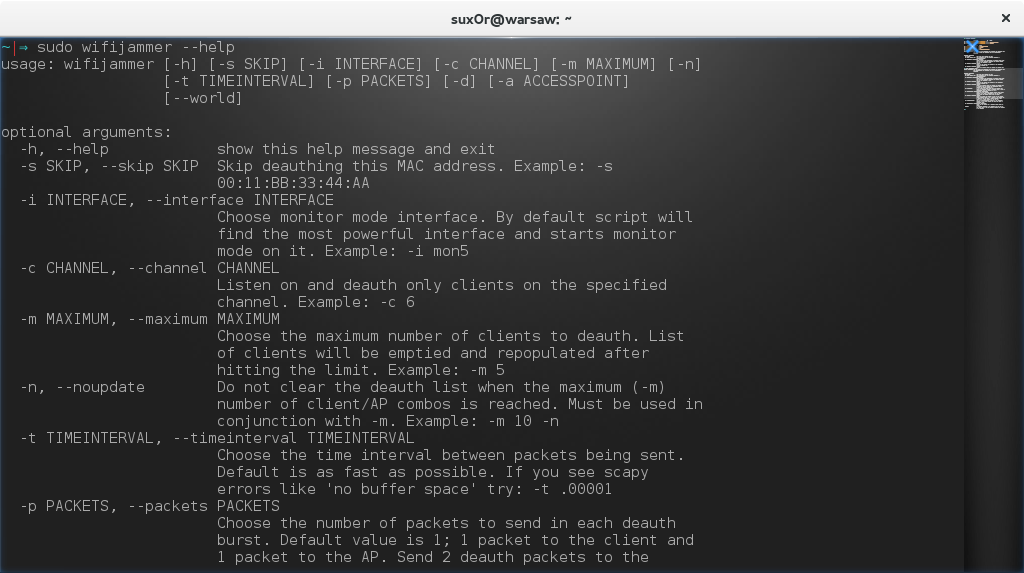
wifijammer has got many other flags you can check out all flags using this command that you always knew:

sudo wifijammer -h


Hope you enjoyed it, good bye and have fun :)
Related word

14 Emuladores De Android Para PC

Diversidad de opciones e innumerables aplicaciones sobre emuladores de Android para ordenadores se han vuelto tendencia en el mundo tecnológico, no solo por llevar bastante tiempo entre nosotros, sino también por su desempeño e información valiosa que nos ofrecen. En esta importante selección presentamos los mejores emuladores disponibles, considerados como los más rápidos y completos.
Y aunque es posible dejar pasar por alto alguno que en verdad merezca ser mencionado, te invitamos para que deje en los comentarios su preferencia y de esta manera lo incorporemos de inmediato a esta lista. Recordar que todos los emuladores de Android para PC implementan una experiencia casi completa con Android en el ordenador y que en este artículo trataremos de repasar alguno de ellos.
https://www.dominatupc.com.co/
Antes de iniciar y dar a conocer las distintas alternativas daremos un repaso para saber que es un emulador de Android y para qué sirve.
  • Es una opción que nos permite utilizar Apps de Google Play en tu ordenador y en las diferentes versiones de Windows.
  • Convertir tu PC en un dispositivo móvil para disfrutar de videosjuegos y aplicaciones de todo tipo.
Siguiendo el post sobre el tema relacionado a emuladores, el siguiente paso sería presentar la selección de los mejores y más aplicados para los distintos sistemas operativos.
Un emulador para PC completo y con la mejor experiencia de empleo posible. Con características en simulador de GPS, personalización flexible, compartir datos entre Windows y Android, crear copias y algunas opciones más que podemos ir experimentando a la hora de utilizarlo.
Uno de los más antiguos, activos y aprovechados del mercado. Con una destreza de fácil manejo para usuarios básicos y con poco conocimiento, es realmente el más indicado para este tipo de tareas, con variantes gratuitas y de pago. Algo muy incómodo para los consumidores es el exceso de anuncios.
El indicado para usuarios que dedican su tiempo a los juegos. Es un emulador que permite ejecutar variedad de aplicaciones y juegos de Android en los distintos sistemas operativos de Windows, ya sea escritorio o portátiles, pero si descartar la instalación en dispositivos macOS.
Es un emulador que propone una optimización completa y brinda una experiencia única y fluida con capacidad de mapeo de palabras clave. Además, el modo de pantalla completo es estupendo y no podemos dejar por alto la opción de arrastrar y soltar archivos desde Windows al emulador y viceversa, es realmente eficaz.
Un programa muy práctico para ejecutar aplicaciones de Android nuevas, ya que es realmente rápido y soporta juegos con gráficos muy altos, es decir, los lanzados recientemente. Con una interfaz muy simple, la instalación es rápida y sin bloatware.
https://www.dominatupc.com.co/
Si eres amante el juego PUBG, este software está diseñado exclusivamente para este tipo de entretenimiento. Un emulador desarrollado para jugar Pubg mobile en ordenadores. Es compatible con GPU, lo que indica que el rendimiento es más efectivo. Además, permite grabar el juego, reasignar claves y la instalación es súper sencilla.
A pesar de que tiene bastante funciones para un mejor desempeño y permitiendo un mejor rendimiento en sus apoderados juegos es recomendable para usuarios expertos en tecnología, ya que viene con una amplia selección de alternativas para su personalización, lo que hace una instalación poco compleja.
En comparación con la anterior aplicación Droid4x busca que cada usuario pueda instalar y configurar sin ningún problema, con una interfaz simple, el usuario puede navegar y ejecutar juegos y aplicaciones en Windows y MacOS sin complicación alguna. La única desventaja es que debes ejecutar en una versión anterior de Android, ya que los últimos juegos no serán compatibles con este emulador permitiendo un desempeño mínimo de hardware y software, esto obedece a que los desarrolladores detuvieron la App el 28 de marzo de 2016.
Un emulador perfecto para desarrollar, probar y publicar App de Android. En relativa es un software diseñado únicamente a los desarrolladores de aplicaciones, por lo tanto, no se admite para ejecutar juegos o aplicaciones de Android. Simula un dispositivo Android en el ordenador para poder realizar pruebas a diferentes dispositivos y niveles de API.
Con una mejora en cuanto a su versión en la nube, ya que permite su ejecución consumiendo menos recursos del ordenador. La principal ventaja es ofrecer a los desarrolladores mas de 3.000 configuraciones de dispositivos virtuales. Lo que indica un buen desempeño a los móviles más antiguos. Lo negativo es su tarifa de pago y aunque ofrece una versión gratis, para disponer de todas las funciones se requiere hacer un aporte adicional.
Un emulador bastante peculiar, ya que es compatible con casi todos los juegos y que tiene la posibilidad de ejecutarlos en pantalla completa como si fueran oriundos de tu navegador. Tiene versiones para Windows y macOS y está probado en Android con versión 4.4.2.
https://www.dominatupc.com.co/
Una particular fuente con creatividad auténtica y poseedora de videojuegos propios. La idea de este emulador es ofrecer una interfaz totalmente diferente en formatos de aplicación natural como puede ser Steam. 
Ofrece una experiencia completa de escritorio similar a Windows o macOS, ofreciendo cientos de aplicaciones de Android que estarán disponibles para su diversión. Aunque no es un emulador para su uso, representa un sistema operativo basado en Android que puedes instalar en una partición de tu PC, para luego ejecutarlo al iniciar el ordenador.
Similar al emulador anterior es otra opción como sistema operativo basado en Android, el cual puedes instalar en cualquier ordenador Windows para luego ejecutarlo como un sistema operativo alternativo. Es verdaderamente una opción clave que admite personalización y algunas características mediante sincronización en todas las plataformas.
Ya los sabes, tienes a tu disposición diferentes opciones para poder disfrutar de tus juegos favoritos y preferidos de Android en tu PC. No te olvides de compartir y seguirnos en las diferentes redes sociales. También te puede interesar:(Las mejores páginas Web para descargar juegos de PC


Related word

How To Start PHP And MYSQL | The Best Server For PHP And MYSQL | Tutorial 1


Many of people want to start PHP programming embedded with MYSQL databases concepts. So i thought that I should start a series about PHP and MYSQL. So in this series of video tutorials you exactly got the content about PHP and MYSQL.

As PHP is server side scripting language. So it requires a server to get execute over the web browser. First of all you have to download and install a server that may be XAMPP, WAMPP or LAMPP. I'm using XAMPP server in the tutorials. So if you wanna follow me then download a XAMPP server. I'm using this because it has a good interface to work  and it's really simple. XAMPP is compatible with windows, MAC and Linux operating as well. WAMPP is only for windows and LAMPP is used for MAC and Linux operating system. So i prefer XAMPP for this series.

How to create Database

Step 1:

Open Your XAMPP control panel and start Apache and Mysql services.

Step 2:

Go to your Web browser and type "localhost/phpmyadmin". It will open your databases area. If you have an error then your services are not in running state. If you have any error then comment below.

Step 3:

Click over the "new" to create a new database.

Step 4:

Write Database_Name and click over the Create button. For example Facebook, Students etc.

Step 5:

Write Table_Name like admin, users etc. your can increase and decrease the size of rows. Click over Save/Create button.

Step 6:

Write your Attribute_Names in first column like Username, Email, Passwords etc. In the next data type column you have to select the data type whether it is integer or string type etc. In the next column you have to set the length of string/words.

Step 7:

If you wanna go through with a Primary_Key. Then just you have to checked the Auto_Increment box as you will shown in the video. For further watch the video for better understanding.